What you’ll learn
- What is Meta Business Suite, and is it free?
- Why can't I find Business Manager any more?
- How to connect your Page, Instagram and WhatsApp to Meta Business Suite
- Schedule four weeks of posts in one sitting
- How to reply to Facebook, Instagram and WhatsApp messages from one inbox
- How to see which chats turn into leads and orders
Meta Business Suite is Meta's free tool for running your Facebook Page, Instagram account and WhatsApp Business chats from one place. You schedule posts, reply to messages and comments, check Insights and run simple ads.
It's also where you decide who controls your Page. This guide covers both. Every setting name and limit here comes from Meta's own help pages, read on 5 November 2026, because Meta renames things often.
If you'd rather not do the posting yourself, our social media team writes and posts for you. The social media management plans start at S$500 a month.
What is Meta Business Suite, and is it free?
Meta Business Suite is Meta's free tool, on desktop and in an app, for running a business on Facebook and Instagram, plus Threads and WhatsApp. It holds your content calendar and one inbox for messages and comments, with Insights and a simple ad builder. You need a business portfolio to use it.
You open it at business.facebook.com or in the Meta Business Suite app for iOS and Android. Here's what each part of the left menu does.
| Part | What you do there |
|---|---|
| Home | See your to-do list and notifications, plus recent and scheduled content |
| Planner | See your content and ads on a weekly or monthly calendar, and schedule from it |
| Content | Write and schedule posts, then find them again under tabs such as Scheduled or Drafts |
| Inbox | Answer messages from Messenger, Instagram or WhatsApp, plus comments on your posts |
| Insights | Check views and follows, see who your audience is, and compare yourself with similar businesses |
| Ads | Create simple ads, boost posts and track how they did |
| All tools | Open Ads Manager, plus billing and your Page settings |
| Settings | Choose who can work on your Page and accounts, agencies included |
Why can't I find Business Manager any more?
Plenty of guides still send you to Meta Business Manager. Neil Patel's (updated 6 July 2026) calls it the back-end tool for access, and OOm's (last edited 15 May 2024) compares it with Business Suite and Creator Studio. The Meta help pages we read for this guide don't use that name.
Meta now calls the container a business portfolio. It holds your Facebook Page, Instagram account, ad account and other assets, plus the people who can work on them. You manage it from Settings inside Business Suite. The access levels have new names too:
| Name Meta uses now | What it used to be called | What the person can do |
|---|---|---|
| Full access | Full control | Everything: settings, people, assets, partners, even deleting the portfolio |
| Basic access | Employee | Work only on the assets they're assigned. New people get this by default |
| Apps and integrations | Developer | Set up the Conversions API, monitor events, edit apps and create access tokens |
| Finance access | Meta gives no older name | View or manage spend, invoices or payment methods |
| Temporary access | Meta gives no older name | Basic access for 3 to 75 days, then Meta removes them automatically |
The tool itself was renamed earlier. Meta's own scheduling help says Facebook Business Suite is now Meta Business Suite, so a guide that says Facebook Business Suite means the same thing.
Need help with your social media? See our social media service and prices.
Book a call ›How to connect your Page, Instagram and WhatsApp to Meta Business Suite
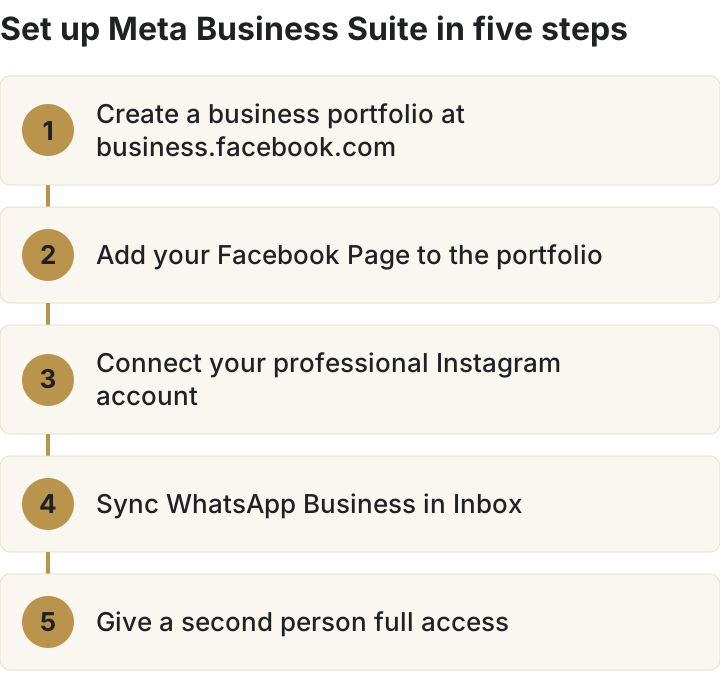
Do these five steps in order. Each one depends on the one before it.
- Create a business portfolio. Go to business.facebook.com, open the drop-down below Home and click Create a business portfolio. Use your business's public name, with no special characters. You get full access to it. One person can create up to two portfolios.
- Add your Facebook Page. An asset can belong to only one portfolio, so a Page sitting in a former agency's portfolio has to come out of theirs before it can go into yours.
- Connect Instagram. You need a professional (business or creator) Instagram account, full control of the Page, and both in the same portfolio. In the Instagram app, go to Edit profile, tap Page, then Connect or create. Once they're linked, anyone with access to either one can manage both.
- Sync WhatsApp Business. In Inbox, open the WhatsApp tab and click Get started. Keep your phone on charge with the WhatsApp Business app open while it runs.
- Add a second person with full access. Meta recommends two active people with full control, so sensitive changes need a second approval and you're never down to one login.
Schedule four weeks of posts in one sitting
Click Create post from Home or the Content tab. Under Post to, pick your Facebook Page, Instagram account or a Facebook group. Add up to ten photos for Instagram, then write the text. You can change the wording for Facebook and Instagram separately.
Under Scheduling options, pick the date and time. The Active times button suggests slots based on when your followers were most active over the past seven days. Then click Schedule, Publish or Finish later.
For a Page post, the time has to be between 20 minutes and 29 days away. So plan in blocks of four weeks. Planner then shows everything on a week or month view. Hover over a day and click Schedule to add more, or click a post and choose Options to move or delete it.
Need ideas to fill the month? Our Facebook post ideas list helps, and the social media image sizes guide stops Instagram cropping your graphics.
Schedule in Singapore time
"All times for scheduling correspond to your current time zone." Facebook Help Centre, read 5 November 2026
So if you schedule while you're overseas, the time you pick is local to where you are. Convert it to the Singapore time you want first. Meta's Moments feature, which suggests dates to post around, only works for US businesses for now. Add your own: Chinese New Year, Hari Raya, Deepavali, National Day and your sale dates.
What you can share to more than one place
| You create a | You can also share it to |
|---|---|
| Facebook post | Facebook Stories, Instagram Feed, Facebook Groups, Threads |
| Instagram post | Facebook Feed, Instagram Stories, Facebook Groups, Threads |
| Facebook story | Instagram Stories |
| Instagram story | Facebook Stories |
| Instagram reel | Instagram Stories, Facebook Reels, Facebook Groups |
| Facebook reel | Facebook Stories, Instagram Reels, Facebook Groups |
Sharing to Threads only works on desktop. Your Page and Instagram account must be connected and in the same portfolio.
How to reply to Facebook, Instagram and WhatsApp messages from one inbox
Inbox puts every Messenger and Instagram message in one list, with WhatsApp beside them once you sync it. You can view them together or filter by app. Comments on your Facebook and Instagram posts sit in the same place, so you can answer both without switching apps.
- Mark a chat unread or to follow up, or move it to Spam or Done.
- Filter by unread, follow-up, who it's assigned to, or replies to an ad.
- Add labels, an email address, a phone number and private notes to a customer's profile.
- Search by person, label or message text.
- Track and message leads from the leads tab. Leads Centre puts leads from chats, click-to-message ads and lead ads in one list.
Adding your WhatsApp Business chats in Singapore
Syncing WhatsApp Business with Inbox only works in some places. Meta's list of places where it isn't available is Australia, Japan, Nigeria, the Philippines, Russia, South Africa, South Korea, Turkey, the EEA, the EU and the UK. Singapore isn't on it.
When you sync, you can bring over your contacts and up to six months of one-to-one chats. Group chats don't move, and groups and status don't appear in Inbox. You can keep using the WhatsApp Business app beside Inbox for those. Meta will also tell your customers that their chats are now managed through a Meta service.
If someone answers your messages from the Philippines, check they can see the WhatsApp tab before you rely on it. For bigger message volumes, our guides on the WhatsApp Business API and moving from the app to the API explain the next step up.
Automatic replies you can set up
| Automation | What it does | Where you set it |
|---|---|---|
| Instant reply | Greets someone the first time they message you | Desktop or app |
| Away message | Replies when you're marked away, on a weekly schedule you set | Desktop or app |
| Frequently asked questions | Suggests questions people can tap and sends your answer | Desktop or app |
| Location, contact details, hours | Answers those three questions for you | Desktop or app |
| Custom keywords | Replies when a message contains up to five words or phrases you choose | Desktop only |
| Comment to message | Sends a message when a comment uses a hashtag you choose | Desktop only |
Keywords are case-sensitive and have to match exactly. A keyword reply goes out after 15 minutes unless you answer first. If a template automation such as the away message fires too, Meta sends the template reply instead of the keyword one.
The away message has no on or off switch. It follows your schedule. To stop it, set yourself as available every day from 00:00 to 23:59.
How to see which chats turn into leads and orders
Open Insights from the left menu. The overview covers the past 28 days. For a business that sells through chat, start with the Messaging tab. It shows how many people messaged you, new against returning contacts, the leads and orders that came from those chats, and your response rate and time.
Then use the other tabs:
- Results shows views, content interactions and link clicks.
- Content lists every post with its numbers, so you can see which ones people clicked.
- Audience shows who your followers are and when they're active.
- Benchmarking compares you with businesses in your category that have a similar 28-day organic reach.
- Ads shows how boosts and ads made in Business Suite performed.
Insights reports on activity on your Page and Instagram account. A customer who reads your post and then calls you won't show up there. Meta points you to Ads Manager for offline performance tracking. Our Instagram algorithm and Instagram engagement guides explain what moves the reach numbers.
When to boost from Business Suite and when to move to Ads Manager
Business Suite's ad builder is the short version. Meta's own help page splits the jobs like this:
| Job | Use |
|---|---|
| Boost a post, or schedule a boost | Business Suite |
| Create a simple ad with a quick setup | Business Suite |
| Run several ad sets in one campaign | Ads Manager |
| Target a custom audience | Ads Manager |
| Schedule when ads show | Ads Manager |
| A/B test ad sets or campaigns | Ads Manager |
| Retarget past customers | Ads Manager |
| Run a Shops ad | Ads Manager |
Boost posts that are already doing well without money behind them. Once you want to pick the audience yourself, move to Ads Manager. Start with our guides to Facebook ad targeting, custom audiences and remarketing. For budgets, see what Facebook ads cost in Singapore and whether lead ads or conversion ads suit you. If you'd rather hand the ads over, that's our Facebook and Instagram ads service.
Set up access so a staff member leaving can't take your Page with them
Pages get lost two ways. A staff member sets everything up under their personal profile and then leaves. Or an agency puts your Page inside its own portfolio. Both are fixable, and both are easier to prevent.
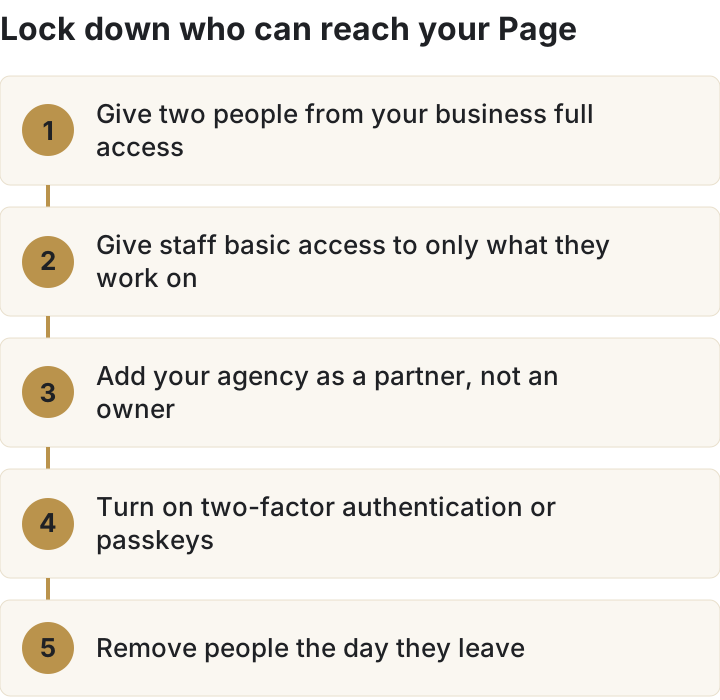
- Give full access to two people from your own business. Meta recommends two active people with full control, and suggests keeping it to ten or fewer.
- Give everyone else basic access, assigned only to the Page or account they work on. Partial access to an asset covers jobs like posting, ads or replying to messages.
- Use temporary access for a freelancer or intern. It lasts 3 to 75 days and ends on its own.
- Add your agency as a partner. Meta lets you give a partner access to your assets, so the Page stays in your portfolio.
- Turn on two-factor authentication or passkeys. Meta's Security Centre suggests removing anyone without them.
- Remove leavers the day they go. The Security Centre also flags people who haven't logged in for 90 days, and people using a public email domain.
To check who has what, go to Settings, then People. Anyone with full access can export a file of everyone's permissions, when they were last active and whether two-factor authentication is on.
Your Inbox also holds customers' phone numbers and notes. Singapore's PDPC says organisations must make reasonable security arrangements to stop unauthorised access to personal data. On our reading, tidy access settings in Business Suite are part of that.
Why can't I see Planner, Inbox or my WhatsApp messages?
Most of the complaints about Business Suite come down to permissions, region or a folder that doesn't sync. Meta's help pages give these reasons:
| What's wrong | Meta's reason | What to do |
|---|---|---|
| No Planner in the menu | You may not have content permission for that Page or account | Ask someone with full access to give you content permission |
| No Inbox in the menu | You may not have permission for that Page or Instagram account | Ask someone with full access to give you access to messages |
| No WhatsApp tab in Inbox | You may be in a place where syncing isn't available | Check Meta's list, or have someone in Singapore set it up |
| Some Instagram messages missing | Inbox only shows Instagram's main folder, not Hidden requests | In Instagram, move those chats to the main folder |
| WhatsApp chats stopped coming in | The WhatsApp Business app wasn't opened for 20 days | Open the app, then connect it in Inbox again |
| Can't connect Instagram to the Page | It needs a professional account, full control of the Page and the same portfolio | Switch to a professional account and move it into your portfolio |
| Comments on a collab post missing | Only the account that created the post sees its comments | Ask your partner to reply, or create the post yourself |
Which Business Suite features to use, and which to skip
Use Planner, Inbox with WhatsApp, the Messaging tab in Insights, and boosts for posts that already work. That covers most of what a small business needs from Meta's apps.
Skip or work around the rest:
- It covers Meta's apps only. TikTok and LinkedIn need their own tools, and so does YouTube. Our TikTok ads cost guide covers the TikTok side.
- Anything past a simple ad belongs in Ads Manager, as the table above shows.
- WhatsApp groups and status stay in the WhatsApp Business app.
- Keyword automations, comment-to-message and sharing to Threads are desktop only.
- It schedules what you give it. Meta's AI can suggest content ideas, but someone still has to write and design the posts.
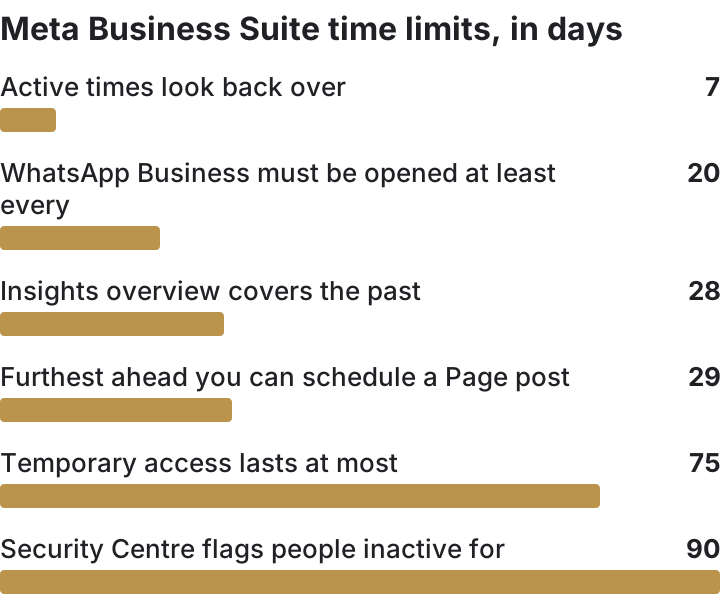
Here are the time limits from this guide in one place:
| Limit | Days |
|---|---|
| Active times look back over | 7 |
| WhatsApp Business must be opened at least every | 20 |
| Insights overview covers the past | 28 |
| Furthest ahead you can schedule a Page post | 29 |
| Temporary access lasts at most | 75 |
| Security Centre flags people inactive for | 90 |
Frequently asked questions about Meta Business Suite
Is Meta Business Suite free?
Yes. Meta says it's free to use on desktop and in the mobile app. You only pay for ads you choose to run.
Is there a Meta Business Suite app?
Yes, for iOS and Android. You can post, schedule, reply in Inbox and check Insights from it. Keyword automations and sharing to Threads still need the desktop version.
How far ahead can I schedule a post?
For a Facebook Page post, between 20 minutes and 29 days ahead. Times follow your current time zone.
Can I use WhatsApp Business in Meta Business Suite in Singapore?
Singapore wasn't on Meta's list of places where WhatsApp syncing is unavailable when we read it on 5 November 2026. Open Inbox, then the WhatsApp tab, to start.
Is Meta Business Suite the same as Business Manager?
Not quite. Business Suite is where you post and reply, and where you read Insights. The access and asset settings older guides call Business Manager now sit in your business portfolio's Settings inside Business Suite.
Can I schedule Instagram reels and stories?
Yes. You can schedule reels and stories as well as posts, for Facebook and Instagram, on desktop or in the app.
Rather not write and post every week yourself?
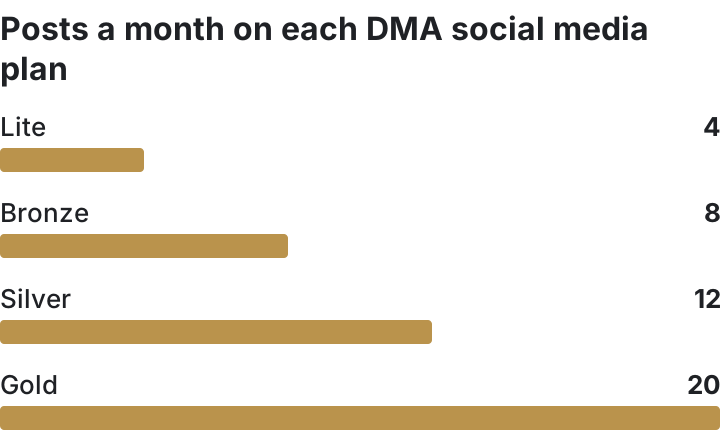
Our social media marketing team writes the captions, makes the graphics, posts for you and sends a monthly report. You keep ownership of your Page and accounts. Prices from our pricing page, read 5 November 2026:
| Plan | Posts a month, up to | 12-month plan, per month | Month to month |
|---|---|---|---|
| Lite | 4 | S$500 | S$714 |
| Bronze | 8 | S$1,000 | S$1,429 |
| Silver | 12 | S$1,500 | S$2,143 |
| Gold | 20 | S$2,000 | S$2,857 |
Every plan includes Facebook and Instagram setup if you need it. Silver and Gold add boosting. TikTok or LinkedIn costs S$50 more on Lite and S$150 more on Gold. Annual plans are paid up front, with no refund after 14 days. Not sure you need help? Read what to check before hiring a social media company, then book a call.
Sources, read on 5 November 2026
- Meta, How Meta Business Suite works: facebook.com/business/help/205614130852988
- Meta, About business portfolio and business asset permissions: facebook.com/business/help/442345745885606
- Meta, How to create a business portfolio: facebook.com/business/help/1710077379203657
- Meta, Best practices for making a business portfolio more secure: facebook.com/business/help/608572510632070
- Meta, Connect or disconnect your professional Instagram account and a Facebook Page: facebook.com/business/help/898752960195806
- Meta, Create and manage posts in Meta Business Suite on desktop: facebook.com/business/help/942827662903020
- Meta, Use Planner in Meta Business Suite on desktop: facebook.com/business/help/1678733516458988
- Facebook Help Centre, Schedule a post and manage scheduled posts for your Facebook Page: facebook.com/help/389849807718635
- Meta, About cross-posting to Facebook, Instagram and Threads: facebook.com/business/help/914097058035853
- Meta, About Inbox in Meta Business Suite: facebook.com/business/help/294426838452244
- Meta, How to sync a WhatsApp Business account with Inbox: facebook.com/business/help/353293243562513
- Meta, About automated responses in Meta Business Suite Inbox: facebook.com/business/help/395965998733706
- Meta, Troubleshoot Meta Business Suite Inbox issues: facebook.com/business/help/1553463246785273
- Meta, About Insights in Meta Business Suite on desktop: facebook.com/business/help/700570830721044
- Meta, When to use Meta Business Suite and when to use Meta Ads Manager: facebook.com/business/help/1295113229118502
- Meta, Schedule Facebook and Instagram content on the Meta Business Suite mobile app: facebook.com/business/help/609176706604372
- Meta, Best practices for using the planner: facebook.com/business/help/1170295510042639
- PDPC, Data protection obligations: pdpc.gov.sg
- OOm, How to Master Meta Business Suite (edited 15 May 2024): oom.com.sg
- Neil Patel, How to Use Meta Business Suite (updated 6 July 2026): neilpatel.com